AirTag Scan: Bluetooth Tracker
- 4.5
- Rating
- 1.00M
- Installs
- Free
- Price

 Analysis by App-foxy
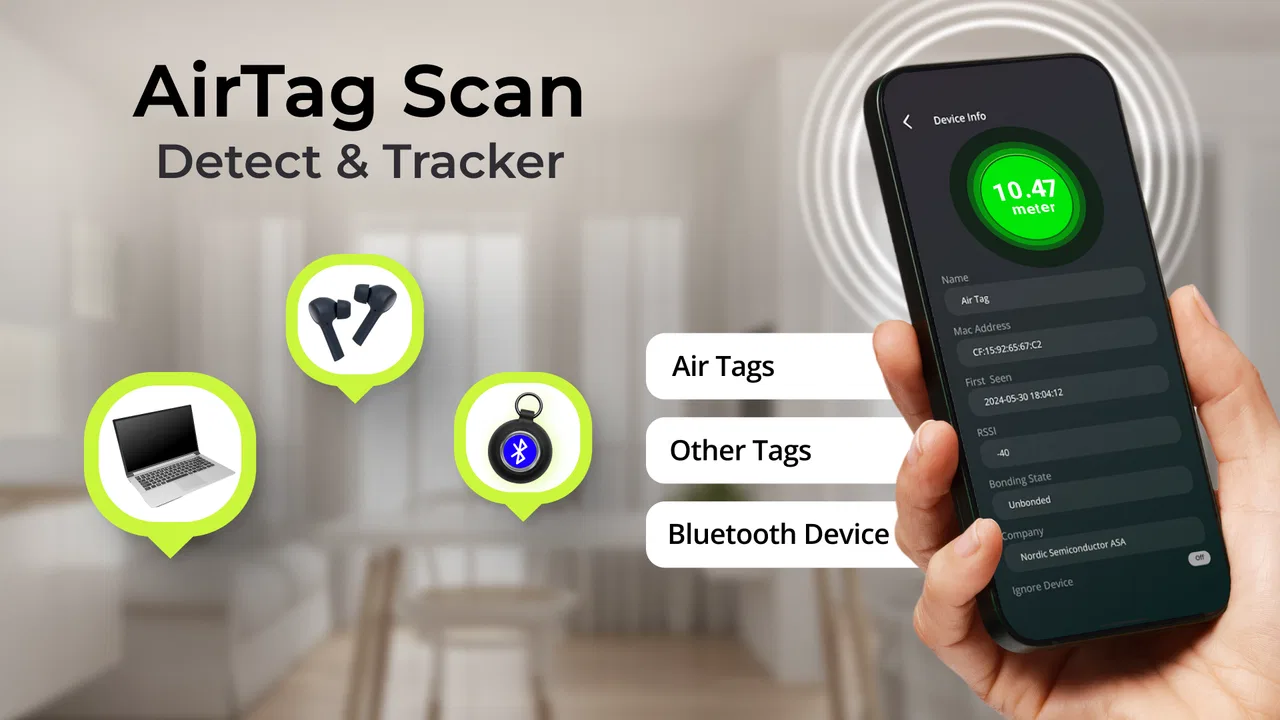
AirTag Scan: Bluetooth Tracker is a focused tools app from One Music Player for people who want a simple way to check nearby Bluetooth devices, AirTags, and possible hidden trackers. I approached it as a practical safety utility rather than something I would leave open all day. Its purpose is narrow, but that can be a real advantage when I need a quick scan without sorting through a larger collection of unrelated functions.
The app is free to install and suitable for everyone, with optional purchases ranging from $0.99 to $99.99 per item. It has reached over a million installs and holds a 4.5 average from around eleven thousand ratings, which suggests that the basic idea has found a sizeable audience. Those figures do not make it automatically right for every phone, though. The useful question is whether its focused approach fits the way you want to check your surroundings.
How AirTag Scan fits into everyday checking
The most obvious use is a quick check before leaving a hotel room, rental car, office, or unfamiliar location. I would open the app, begin a scan, and use the results as a prompt to inspect anything that seems unfamiliar. That workflow is more useful than treating the app as a magic detector: a scan can point you toward a Bluetooth signal, but you still need to identify the physical object and decide what action makes sense.
You May Also Like

 Blood Strike: 2.5 Anniversary
Blood Strike’s Loadouts Turn Every Drop Into a Tactical Gamble
A close look at Blood Strike’s custom loadouts: how fast access to signature weapons reshapes its battle royale rhythm, rewards preparation, and narrows the gap between fights.

 Pandora - Music & Podcasts
Pandora’s Music Is Easy to Start, but Harder to Recover
Pandora’s strength is its low-effort path from a seed to a station. Its weak spot is how much confidence it asks you to place in connection, setup, and quiet recovery.

 8 Ball Pool
 Is Built on Rivalries, Rematches, and Routine
A close look at the rivalries, rematches, shared routines, and unanswered safety questions that turn a quick pool match into a persistent mobile community.

 Samsung Music
’s Quiet Strength Is Playing What You Already Own
Its reach comes less from spectacle than from dependable access to a personal library. That simplicity is both the app’s strongest retention engine and its ceiling.

 AccuWeather: Weather Radar
AccuWeather Review: A Quick, Clear Forecast for Everyday Decisions
For everyday plans, the best forecast is the one you can understand quickly. AccuWeather makes rain timing, radar, and local conditions easy to act on, with a few trade-offs.

 Hill Climb Racing
Why Hill Climb Racing Still Turns Crashes Into One More Run
A tiny car, a bumpy hill and one more upgrade: Hill Climb Racing keeps resurfacing because its simple chaos makes every near-miss feel personal.
More From Our News Desk



It can also be handy when a Bluetooth accessory seems to have been left behind. A device hidden in a bag, attached beneath furniture, or forgotten in a vehicle may not be visually obvious. Running a scan while moving slowly through the area gives me a more deliberate process than simply looking around and hoping to notice something. I would repeat the check from different positions rather than trusting one pass.
That is one of the app’s less obvious strengths. The best results come from combining the screen with physical observation. If a signal appears while I am near a coat rack, then disappears as I walk away, that change gives me a useful lead. The app becomes a search aid, not a replacement for common sense or official help when a situation feels threatening.
Its store summary specifically centers on AirTags, Bluetooth devices, and hidden trackers, so I would not install it expecting a general phone-maintenance toolkit. It belongs in the specialized side of the tools category. That focus keeps the purpose understandable, but it also means its value depends heavily on whether you actually have a reason to investigate nearby wireless devices.
What speed feels like in a sensible workflow
For a quick check, I would judge speed less by a stopwatch and more by how quickly I can move from opening the app to a useful result. A good routine is to scan once in the room where I are concerned, pause long enough to notice the entries, and then repeat while changing position. Rushing through a single scan can be less helpful than allowing yourself time to compare what appears and what remains present.
Perceived speed can also change with the environment. A busy public place may contain many ordinary Bluetooth signals, while a quiet room may produce a shorter list. That does not necessarily mean the app is faster or slower; it changes how much information I need to interpret. In practice, I find a focused scanner most comfortable when I use it for a defined question instead of leaving it running without a plan.
There is a useful distinction between detecting a signal and identifying a threat. The first can be quick, while the second requires patience. A device name that looks unfamiliar is not automatically suspicious, and a familiar-looking name is not proof that everything is safe. AirTag Scan is most effective when I treat its results as evidence to examine rather than a final verdict.
Heavy-use moments and practical limits
The demanding moment is not necessarily the first scan. It is repeated checking across a large area, especially when I am walking through several rooms, a parking area, or a crowded building. In that situation, the screen can become harder to interpret because ordinary nearby devices compete for attention. I would narrow the search into sections and make a note of where a signal appears, rather than attempting to remember every entry from one long session.
For a car or small room, a short, methodical routine should be more comfortable than a continuous search. I would check the front, rear, storage spaces, and nearby personal items separately, then repeat from outside the vehicle if something seems unusual. This approach reduces confusion and helps distinguish a signal that travels with me from one that stays in a particular location.
Resource demands matter during extended use, even though this is not an app I would expect to consume attention like a game or video service. Keeping any wireless scan active for a long time is a poor habit if I only need a brief check. I prefer opening it when needed, completing a structured sweep, and closing it afterward. That is better for concentration as well as battery awareness, without pretending that a short review session can establish a precise power cost for every phone.
Optional purchases are another consideration during heavier use. The app can be obtained free of charge, but the presence of in-app items means I would look carefully at what is offered before confirming anything. Someone who only needs an occasional check may find the free starting point sufficient, while a frequent user should decide whether any paid option genuinely improves their workflow rather than buying simply because the app presents an upgrade.
Reliability depends on interpretation
Reliability here has two layers. The first is whether the app consistently gives me a scan result. The second is whether I interpret that result correctly. Even a stable scanner cannot tell me, by itself, whether a nearby device belongs to me, a family member, a neighbor, a shop, or someone with harmful intent. That is why I would never use one scan as the sole basis for accusing someone or making a safety decision.
A repeatable process improves confidence. I would scan from the same location, move several steps, scan again, and then check whether the suspicious entry behaves consistently. If it follows my belongings, I would inspect those belongings. If it remains near a fixed object, I would examine that area carefully. This is a more reliable use of the app than collecting a long list of device names with no physical follow-up.
Recovery after an interrupted check is straightforward in principle: close the session, return to the area, and begin again with a smaller search plan. I would not assume that an incomplete scan proves there is nothing nearby. Likewise, I would not treat a temporary result as proof that a tracker has disappeared. The sensible recovery method is repetition under similar conditions, followed by a physical inspection.
That limitation is important for anyone expecting certainty. A dedicated scanner can be useful for awareness, but it should not replace platform-specific safety notifications, the device owner’s built-in tools, or assistance from local authorities when a person feels followed or endangered. I see AirTag Scan as an extra layer of checking, particularly useful when I want a direct, focused view of nearby Bluetooth activity.
Device constraints and compatibility
The current version is 7.0.2, and the app supports devices running Android 8.0 or later. That makes it accessible to many Android users, but anyone with an older phone should check compatibility before planning around it. The operating system requirement is not a minor detail for a safety tool: if the app cannot be installed on the phone you carry, its usefulness ends before the first scan.
Phone hardware and the surrounding environment can affect the experience. Bluetooth behavior is not identical across every Android model, and a crowded wireless area can make results more difficult to sort. I would therefore test the app in a familiar place before relying on it during travel. A short practice run can show whether the interface is comfortable on your screen and whether you understand what its results are showing.
I also recommend keeping expectations realistic about distance. A scan is not a substitute for a precise measuring instrument, and I would not use a displayed device presence to infer an exact location. Moving closer and farther away can help with a search, but walls, vehicles, people, and other signals can complicate the picture. The app is better suited to narrowing attention than drawing a perfect map.
People who want a full Bluetooth management suite may prefer the tools already built into their phone or a manufacturer-specific utility. Those alternatives can be better for pairing, renaming, and controlling accessories. AirTag Scan has a different purpose: it is more appealing when the question is “what might be around me?” rather than “how do I manage the devices I already own?”
Who will benefit most from it
I think the strongest audience is someone who travels, uses shared spaces, or wants an additional way to investigate unfamiliar Bluetooth activity. It may also suit a cautious family member who wants a straightforward tool rather than a complicated technical dashboard. The everyone age rating makes it broadly approachable, although younger users should still involve a trusted adult if a scan raises a serious concern.
A realistic scenario would be arriving at a short-term rental and noticing an unfamiliar object near a bedside table. I would first photograph the area, run a scan, and then check whether a nearby result changes as I move around the room. If the signal seems connected to the object, I would avoid dismantling anything or confronting another person. I would document what I found and contact the property manager or appropriate authorities if the situation seemed unsafe.
That example shows both the value and the boundary of the app. It can make a vague worry more structured by giving me a repeatable search routine. It cannot establish ownership, intent, or legal responsibility. Users who need forensic certainty, professional counter-surveillance equipment, or a guaranteed answer should choose a specialist service instead.
I would also skip it if I rarely use Bluetooth-related accessories and have no reason to check for trackers. Installing a narrow tool “just in case” may be less useful than learning the safety controls already available on your phone. Likewise, someone who is easily alarmed by unfamiliar device names may find a scanner stressful unless they are prepared to verify results calmly.
How it compares with ordinary alternatives
The usual alternative is simply checking Bluetooth settings. That is convenient for connecting to known headphones, speakers, watches, and other accessories, but it is not designed around a focused search for unfamiliar nearby devices. AirTag Scan is more direct for the specific task of scanning and reviewing surrounding signals, while system settings remain the better choice for managing devices I already recognize.
Another alternative is a dedicated tracker detector or professional inspection. Those options may be more appropriate for high-risk situations, but they can cost more, require more expertise, or be less convenient to carry. This app’s appeal is accessibility: I can start with a free tools download on a compatible Android phone and decide whether the basic workflow helps me. The trade-off is that convenience should not be confused with professional-grade certainty.
Compared with a broad security app, the focused design is easier to understand. I do not have to navigate unrelated cleanup, antivirus, or privacy dashboards to reach the tracker-checking purpose. On the other hand, a broader security package may offer more kinds of protection in one place. I would choose this app when the immediate need is a Bluetooth and AirTag check, not when I want one application to cover every aspect of mobile security.
My performance verdict
After looking at the way this app fits into real searches, I see its performance as primarily a matter of disciplined use. It is most convincing during short, purposeful checks in a small area, where I can compare scan results with what I see around me. It becomes less comfortable when used continuously in a crowded environment, because interpreting many ordinary signals can take more effort than starting the scan.
Its stability is also best judged by whether it supports a repeatable routine rather than by expecting a single dramatic answer. If a scan is interrupted or confusing, restarting in a smaller area is a sensible recovery step. That makes the app practical for cautious investigation, but it does not remove the need for physical inspection, independent confirmation, or help from a trusted person.
One Music Player has positioned this Android app clearly within the tools category, and the current release, 7.0.2, gives compatible users a straightforward entry point. The free installation lowers the barrier to trying it, while optional purchases mean I would review any upgrade carefully. Its 4.5 average and audience of over a million installs make it worth considering, but my recommendation is based more on the focused use case than on popularity.
My honest recommendation is to use AirTag Scan as a practical first check, not as a final authority. If you want a simple way to investigate nearby AirTags, Bluetooth devices, and possible hidden trackers, it is a sensible app to keep available on a compatible Android phone. If you need exact location data, professional counter-surveillance, or complete Bluetooth management, a different solution will serve you better. For everyday awareness, its narrow purpose is its strongest feature—as long as you pair every scan with patience, context, and sensible follow-up.
FAQs for AirTag Scan: Bluetooth Tracker
01What is AirTag Scan: Bluetooth Tracker used for?
AirTag Scan: Bluetooth Tracker is designed to help you detect nearby Bluetooth tracking devices, including AirTags and other compatible Bluetooth Low Energy trackers. After scanning the surrounding area, the app may display discoverable devices and basic information that can help you identify an unknown tracker. It is mainly intended as a privacy and safety tool, not as a replacement for Apple’s Find My network.
02Can AirTag Scan find any lost AirTag or Bluetooth tracker?
No. The app cannot guarantee that it will locate every lost or hidden tracker. Detection depends on the device being nearby, powered on, broadcasting a detectable Bluetooth signal, and not being blocked by distance, walls, interference, or other conditions. It also may show ordinary Bluetooth devices, so the results should be reviewed carefully rather than treated as proof that a particular tracker belongs to you.
03Does AirTag Scan: Bluetooth Tracker work on both Android and iPhone?
Availability and functionality can vary depending on the operating system, phone model, Bluetooth permissions, and the version of the application. On Android, Bluetooth scanning features may require nearby-device or location-related permissions. On iPhone, Apple’s system restrictions can limit what third-party apps are able to identify. Before downloading, check the official store listing for supported versions and device requirements.
04Is AirTag Scan safe to use, and what permissions does it require?
The app normally needs access to Bluetooth and nearby-device scanning so it can search for detectable trackers around you. Depending on the platform, it may also request location permission because Bluetooth scanning has historically been linked to location services. Review the privacy policy and permission prompts before continuing, and deny any access that does not appear necessary. Avoid entering personal information unless the app clearly explains why it is required.
05Is AirTag Scan: Bluetooth Tracker free to download?
The app may be available to install at no initial cost, but some features can depend on advertisements, subscriptions, or in-app purchases. Pricing, trial periods, and available tools may change according to the country and app-store version. Check the store page carefully before confirming a purchase, especially if advanced scanning functions or an ad-free experience are presented as premium options.
Pros
- Quickly detects nearby Bluetooth trackers and unknown AirTags.
- Useful safety tool for checking unfamiliar trackers around you.
- Simple interface with an easy-to-understand scanning process.
- Helps identify potential unwanted tracking without special hardware.
- Can be used when traveling
- staying in hotels
- or using public transport.
Cons
- Bluetooth scans may miss trackers that are out of range or inactive.
- Some features may require location and Bluetooth permissions.
- Repeated scans can consume extra battery during extended use.
- Detection results may require technical knowledge to interpret correctly.
- It cannot physically disable or remove a detected AirTag.

AirTag Scan: Bluetooth Tracker
Gallery